
1. Overview
To strategically engage with new guests in the two weeks following the Start Party. This engagement is designed to deepen connection, offer help, and invite guests to the upcoming Welcome to Church event.
2. Definitions
Collapsible table of terms, click here to expand or collapse this section..
| Term | Definition |
|---|---|
SOP | Standard Operating Procedure. |
Start Party | Weekly connection point after service in the main lobby. |
Welcome to Church | A [monthly] event for new guests to meet staff and connect with other guests and members |
Planning Center | AKA Planning Center Online or PCO. This is online software used to manage the church, events, groups, etc. |
PEOPLE | A module inside the Planning Center application. |
Workflow | A series of steps which can be assigned to a person. Each step is referred to as a card. |
Card | A step in a workflow, also person in the people database. |
3. Assumptions & Prerequisite Skills
- Moderate computer skills and knowledge are needed.
- This SOP assumes that you know how to navigate to a website and login.
4. Supplies Needed
- A computer with internet access
- Internet Explorer, Safari, Chrome, or other web browser
- Login credentials for Church Center’s PEOPLE application
- Ability to access the First Time Guest Workflow
- Ability to access new user data from digital forms
- Ability to access hard copy Connection Card data
5. Process Steps
BEFORE YOU START: Remember, this may be a SOP, but it is not business. This guide outlines how to perform steps, but these steps are missional in nature. Meaning the people we interact with are more important than the perfection of any step. As part of this understanding, please take a few minutes to pray over what you are doing. Ask God for his blessing and guidance and for a sincere connection with the people you will be connecting with.
5.1 Data Entry (Monday)
This step is all about updating Planning Center Online. It will involve inputting information from physical connection cards as well as verifying the system has accurately captured information from digital submissions. Each time we touch user profiles, it is important to ensure we can fill out as many supplemental data fields as possible so that we can accurately reach out to users based on the data points.
5.1.1 Login to Planning Center Online
click here for video overview of this step
» Access Planning Center Online Website (click here)
- Click “Login”
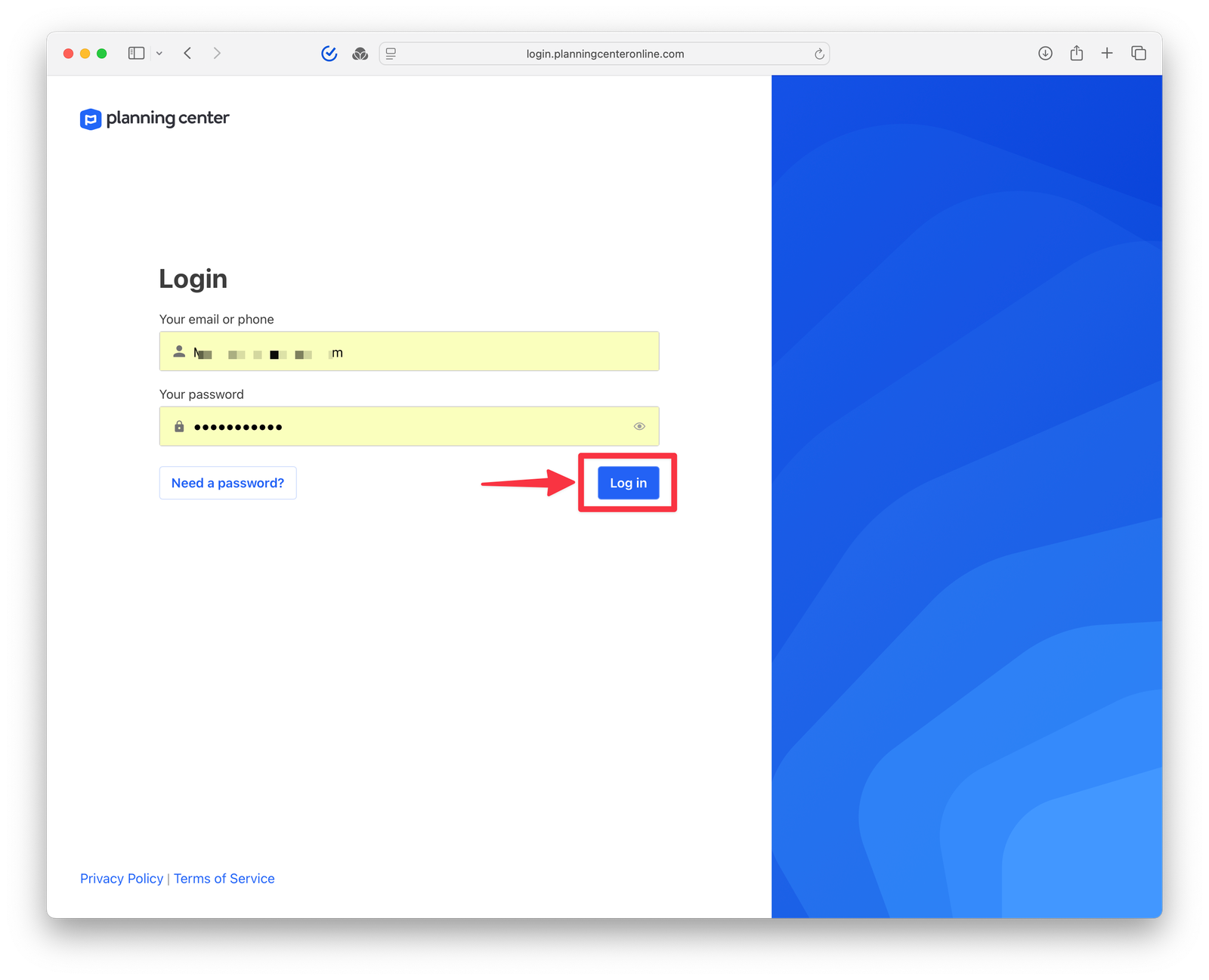
- Navigate to PEOPLE Application
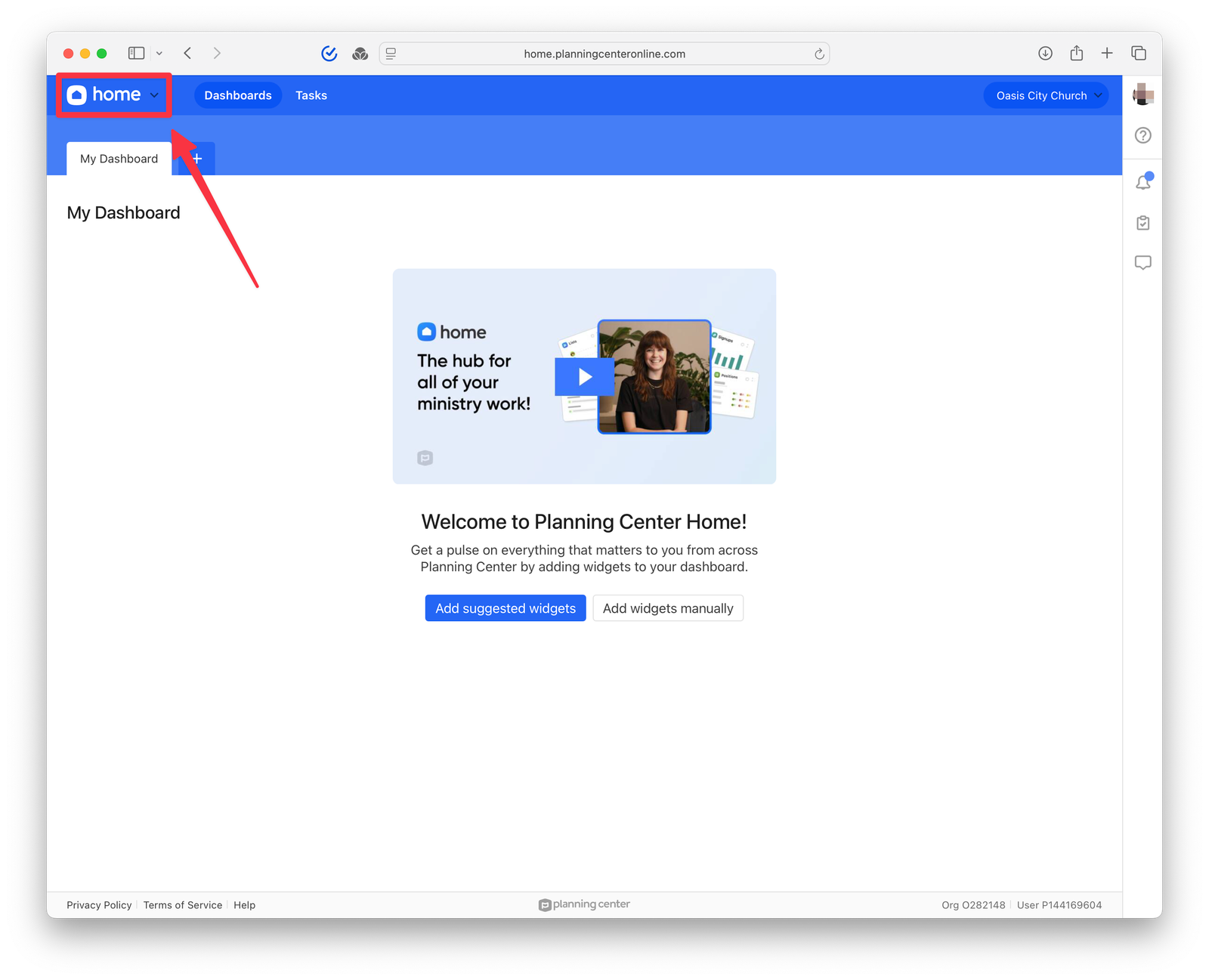
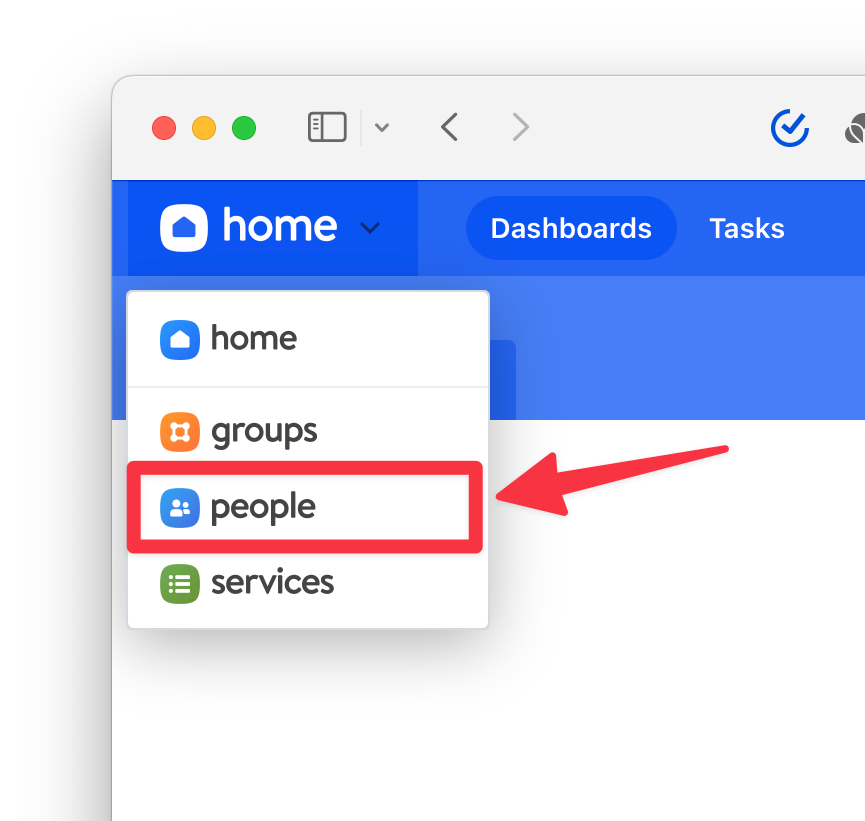
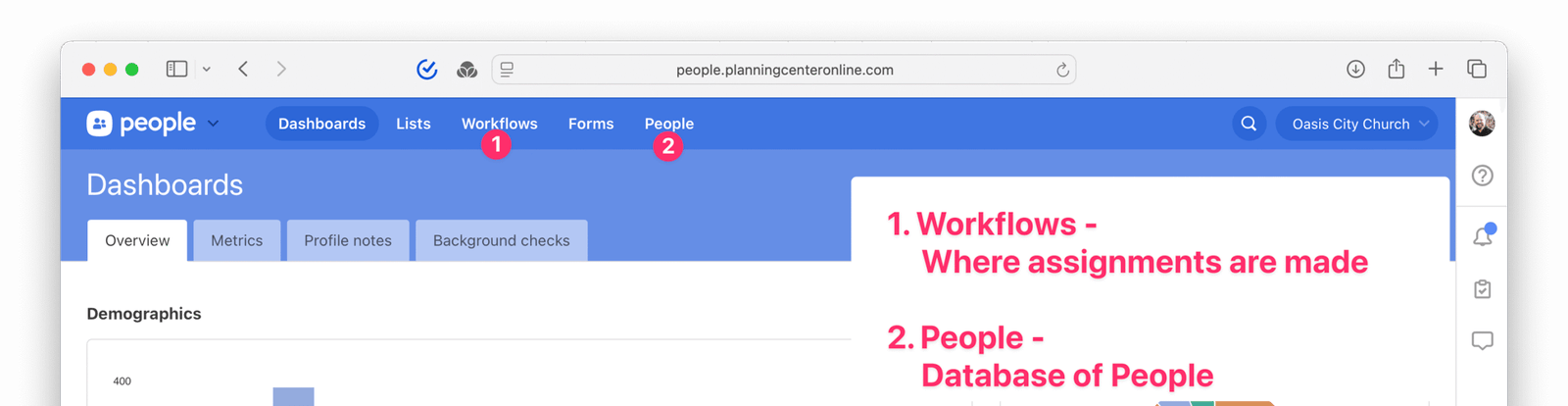
- Navigate to the Submenu – Shown here with red circles underneath
5.1.2 Review Digital Connection Cards
Users who were created by filling out a registration form at the Start Party should automatically have a Card created and should automatically be added to the First Time Guest Workflow.
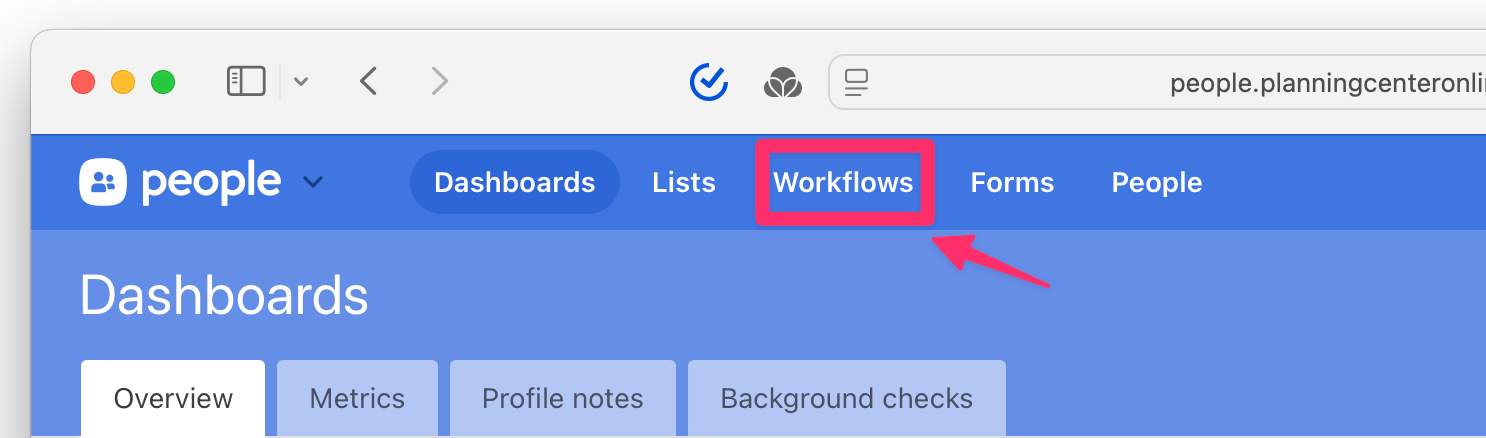
- Navigate to the Workflow by clicking on “Workflows”
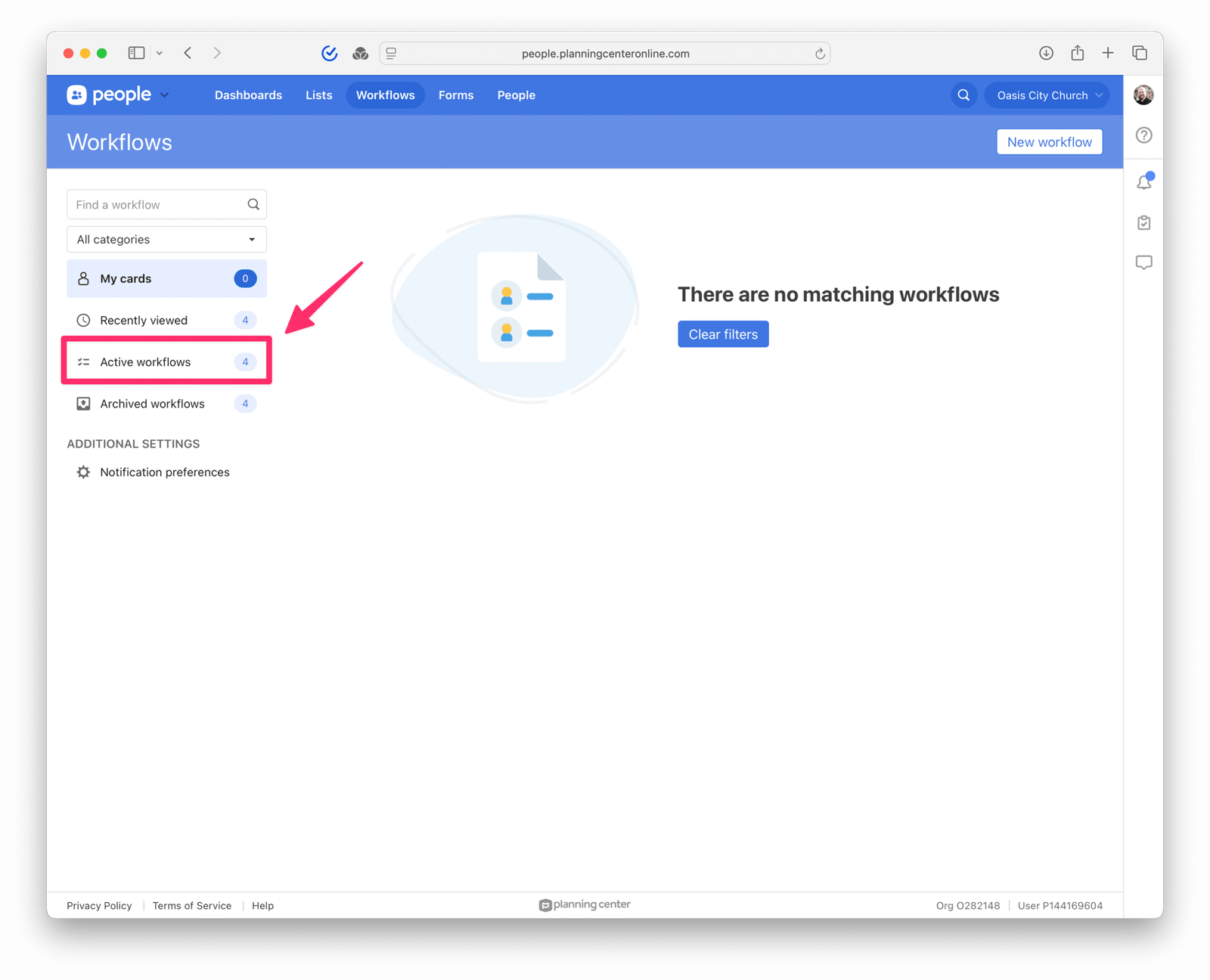
- Navigate to Active Workflows
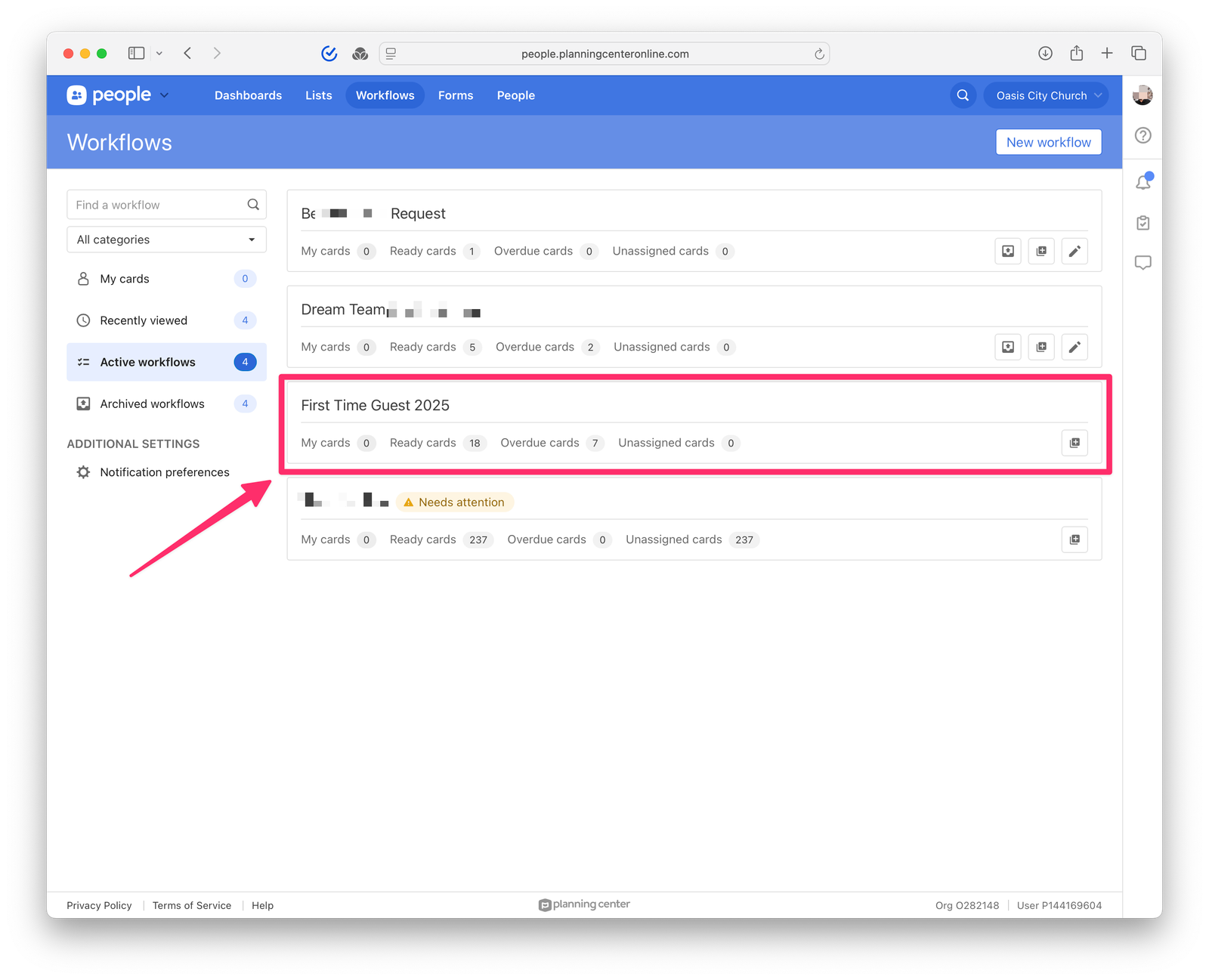
- Select the “First Time Guest” Workflow
- Step 1
- Step 2
- Step 3
5.1.3 Collect Physical Connection Cards
These are collected each week at the Welcome Table. Pick them up, 20 minutes after the final service has completed.
5.1.4 Input Physical Data from Connection Cards into Planning Center Online
- Create New Person(s) in Planning Center by Accurately Copying Data from the Physical Connection Card.
- Access Planning Center Online Website (click here)
- Login to Planning Center Online by clicking “Login” as seen below (yellow arrow).
- Navigate to People App
- Click on People Tab
- Click “Add Person”
- Start Typing Name
- Be Careful to Avoid Creating Duplicates
5.2 Task Assignment (Monday or Tuesday)
This step is where new guests are assigned to our Connection Team to make sure everyone who visits us on a Sunday has someone reaching out with a personal follow-up. [Follow up with Mike for screenshots and instructions.]
5.3 First Contact (Wednesday)
The goal of this step is to establish a connection with our guest.
Preferred Method: Text message in the morning, followed by a phone call in the afternoon or evening (if no response to text message)
Alternate Method: A personalized email, remember to keep the email concise and personal.
Suggested Email Template:
“Hi [Name], it’s [Your Name] from Oasis City Church. Loved meeting you after service @ our Start Party! Just wanted to check in—anything we can help with this week? Also, our Welcome to Church event is coming soon on (insert date) and we’d love to see you there! Blessings on a fruitful week ahead, reach out anytime with questions.”5.4 Second Contact (Friday – Saturday)
The goal of this step is to send a friendly reminder about the upcoming Welcome to Church event.
Objective 1: Invitation to upcoming Welcome to Church event.
Objective 2: Offer to answer questions or assist with connecting them to the children’s ministry, directions, or other needs.
Objective 3: Extend your desire to connect in person on Sunday, ask them which service they plan to attend with the hope you can meet in person and engage in a more personal conversation prior or after service time.
5.5 Third Contact (Following Week)
This step is only used if no prior contact has been successful. This step should be performed with a text or email.
Sample Template:
Orange Text should be replaced as appropriate.
Subject: We’d love to see you at our Welcome to Church event!

Hi [Name],
Hope your week has been going well! Just wanted to personally invite you to our Welcome to Church gathering on [date]. It’s a relaxed time to meet people and learn more about Oasis City Church. Let me know if I can help you with anything or answer questions.

Warmly,

[Insert Name]
5.6 Outcome Tracking & Next Steps
5.6.1 Update Guest Profile Card
After each message to the guest, please update notes in Church Center on the guests profile card.
- Remember to keep the note concise.
Example: “Started reaching out via SMS.” “No response from previous outreach, left voicemail.” - If you are unable to connect with the guest, after three (3) attempts, then you should go to the next step and assign the card to staff.
[Instructions for how to update should go here]
5.6.2 Assign to Staff
Assignment to staff should only happen when one of the following items happen:
- Assignment 1: Guest Expressed Needs that the Staff Can Help Address
[Instructions for how to update should go here] - Assignment 2: Three (3) Attempts have been made to connect with the guest – none of those attempts have succeeded in getting a response.
[Instructions for how to update should go here]
6. Tips for Better Follow-Up
Below is a quick list of tips that can help the follow up process be more comfortable and successful for everyone involved. If you have additional tips, please share with your leadership so we can update this list to be as effective and efficient as possible.
- Keep messages genuine, brief, and encouraging
We are all working with limited time, so let’s not waste any. At the same point, we can all smell when someone is being genuine in their communication efforts or merely going through the motions. In our role, it is imperative that we are genuine as we are not just representing ourselves or the church. We are literally acting on behalf of Jesus. Let’s be genuine and engaged. - Use the Guest’s name
Dale Carnegie, in his book How to Win Friends and Influence People writes that “A person’s name is to that person, the sweetest, most important sound in any language.” To that end, it is great to naturally use the Guest’s name. Let them know they matter enough for us to use their name. - Respect their space
We are trying to establish a connection, not bother the guest. To that end, avoid frequent or overly formal messages. - Track Preferences
If the guest prefers written communication (text/email) over phone, notate it in Planning Center. If they prefer a phone call or an email, notate that as well so future communication is tailored to their preferences. - End with a Clear Invitation
This is not about pressuring anyone into attending church or our Welcome to Church event. Instead, this is about getting a genuine and clear invitation. Example: “I would love to meet up with you this Sunday…” or “I would love to introduce you to some folks I think you’ll enjoy at Welcome to Church next Sunday…”
7. Conclusion
7.1 Our Work Matters
The Connection Team matters! In fact here is some research to illustrate how important our activities are on both church and spiritual growth:
- Prompt Follow-Up Drives Return Visits
In this research, it is shown that guests are 85% likely to return to a church if they have a follow-up within 24 hours of visiting. This drops to 60% by 72 hours and falls to 15% thereafter. (link) - Multiple Touch Points Build Connection
Conversion from visitor to active participant usually requires several interactions – we aim for at least three (3) meaningful touch points. (link) - Guests Stay for Relationships, Not Programs
Feeling seen and cared for is what motivates continued engagement. (link)
7.2 Sample of the Two-Week Timeline
| Timing | Action | Medium |
|---|---|---|
| Monday – Tuesday | Enter guest into Task List | Church Center Online |
| Wednesday | First Contact Check-In | Text & Phone Call |
| Friday – Saturday | Invite to Welcome to Church | Email/Text |
| Following Week | Personal Relational Touch | Text/Email or Phone |
| By 14th Day | Update Status and Assign | Church Center Online |
8. Revision History
Collapsible table of revision history, click here to expand or collapse this section..
| Date | Version | Description | Approval |
|---|---|---|---|
| September 9, 2025 | 1.0 | Initial Release | |